Tuesday, November 27, 2007

New iPhone Project: Mileage


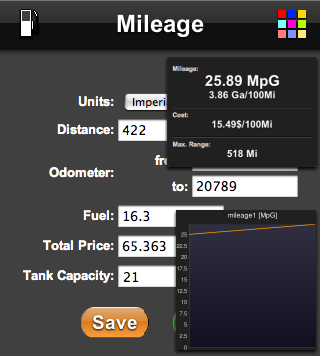
I just released my new iPhone Application: Mileage. It makes it quick and easy to calculate the fuel consumption of your car. In addition to the mileage it can give you the cost per mile and the maximum range.

http://mileage.speedymarks.com

Thursday, November 22, 2007

WorldClockr: Missing Timezones added


WorldClockr now contains a complete list of all timezones to choose from (please shout if I missed another one). Especially all non 1 hour time zones like Indias +5:30 have been added.

You can now have these timezones for your embedded clocks and in the iPhone version as well.

Thursday, November 1, 2007

Why Apple made Safari so fast


Apple claims that Safari is the fastest browser on any platform, and they seem to be right. Since I read that news I have been asking myself:

Why on earth did they put so much engineering effort into such a feature? Does anybody think Firefox, Opera or even IE are too slow? Compared to the network imposed waiting times the rendering doesn't matter. All browsers seem to be fast enough, so putting in more development time to optimize the rendering speed even further doesn't make any sense, right?

This is what I thought until I got the new iPod Touch in my hands. And now I understood. The Safari browser on the iPod (and the iPhone) is fast, by far the fasted browser I ever saw on a handheld device. I feels like a desktop browser and this must be the reason why Apple optimized Safaris rendering speed. Well done.

Wednesday, September 19, 2007

New iPhone Project: SpeedoMeter

I just started a new iPhone Application: SpeedoMeter. Point your iphone to:


http://speedometer.iphonemarks.com


This site helps to calculate the average velocity over a given distance. Use this to measure e.g. your walking and running speed or to calibrate your car speedometer.


Check it out:


Thursday, September 13, 2007

New Project: SpeedyMarks


On SpeedyMarks you can create visual bookmarks for your favourite websites. It is insprired by Operas Speed Dial feature and uses thumbnails from WebSnapr. This makes it the perfect startpage for your browser. The background color of the page and the size of the speedymarks can be changed.


You can add a button to your website to make the addition to SpeedyMarks very easy.

Example: Add (SpeedyMark for this blog)

Please check the iPhone version iPhoneMarks as well.

Saturday, September 8, 2007

New iPhone Project: iPhoneMarks

Screenshot


I started a new iPhone website: iPhoneMarks


iPhoneMarks makes it easy to open web sites on the iPhone, because you don't have to type the full URL. For your favourite web sites you can create visual bookmarks which are stored locally on your phone (not on a server).

Tuesday, September 4, 2007

iPhone versions of WorldClockr and CountDownr

Both projects now have a special Apple iPhone optimized version (which works on other phones with the WebKit browser like the Symbian S60 3rd platform as well). Please check out:

Thursday, April 12, 2007

Firefox on Apple TV - Anybody?

For quite a while now I'm looking a for a decent surf box for my living room. I think all the Media-Center-PCs aren't good enough; they are way to big. The other option would be to use one of the new game consoles. But:


  • the Wii doesn't do HDTV (at least until now)

  • the XBox is too loud

  • the PS3 too expensive and consumes too much energy (180 Watts on standby!)


Now there is the new Apple TV box. Actually the perfect hardware for a surf box. Small, quiet and with HDTV support. Fortunately it's running a stripped down version of OSX so it should be no problem to install and run Firefox on it. OK, I can hear the question already, why not Safari? Wait a minute: an unmodified desktop browser (either Safari or Firefox or any other) will be of almost no use. In order to be a perfect surf box there have to be certain modifications:


  • Usage of the Apple Remote because nobody wants to use a mouse in the living room. Sorry Safari but I can't see the support for that (except Apple is doing it them self). It will be hard enough to come up with a good usage scheme to allow page scrolling, link following, bookmark access and so on with the limited keys of the Apple Remote.

  • Running in full screen kiosk mode and get rid of unnessary toolbars.

  • A basic onscreen keyboard will be necessary to enter a URL and fill in forms (but in the beginning a local customizable start page will do).

  • Integration into the Apple TV menu. That should be easy, because this RSS extension already did it.


So in summary Firefox seems to be the perfect browser to try because it can be customized to almost any extent, can be enhanced by a huge collection of extensions and almost all websites support it.

Is anybody working on that? Please let me know.
Thursday, March 22, 2007

DST support in WorldClockr

WorldClockr now supports the toggle of daylight saving time (DST) for each clock (just about in time for the DST change this Sunday in Europe).
Click the little icon in the lower right corner of the clock:

indicates that DST is used (+1 hour)
indicates no DST

Wednesday, March 21, 2007

Compare


I added a new section to World Clockr where you can compare the Paris world clock directly with the Eiffel Tower web cam. Most interesting will be the times around sunset and sunrise, make sure you don't miss it.

If you want to have the same on your web site, just check the syndication page on how to embed a world clock into your web page.

Wednesday, March 14, 2007

New Project: CountDownr

Screenshot

Today I started my new project: CountDownr.

CountDownr is a little Ajax project which gives everybody his own collection of countdown counters. Each counter is customized to its own time and date when it goes off. There are two types of counters:


  • Counters for a specific date and time. These counters can be repeated daily, weekly, monthly or yearly which advance automatically when the alert goes off. They are perfect for reminders on single events, lunchbreaks, weekends, paying your monthly bills or birthdays and holidays.
    Example: Midnight

  • Counters which read the upcoming events from public Google Calendars. Any public calendar can be the source for a counter. It advances automatically to the next event after each alert.
    Example: Google Developer Calendar