Don't miss him on christmas eve.
Merry Christmas
Monday, December 24, 2007

Friday, December 14, 2007
How To: Turn your iPhone into a Digital Photo Frame
Just before Christmas it's almost impossible to oversee the digital photo frames in the shops. They work like standard photo frames but allow you show slideshows of your pictures and just one.
But did you know, if you own an Apple iPhone (or iPod Touch) you already have a device which you can turn into a photo frame while you are at home? The iPhone comes with a clear, bright and not to small display which makes it perfect to display your photos. There is only one change you will have to do:
That's it. It keeps the background light on all the time and doesn't put the phone to sleep. Now you can go to the Photos application and start a slideshow of your photos and there you have the digital photo frame. Of course you will want to put the iPhone into the dock or at least connect the cable to not use your battery.
The nice thing about using the iPhone as a photo frame is the built in internet connection. Means you are not restricted to your own photos on the phone but you can load and display content from the internet. Here are some ideas:
Of course you aren't restricted to photos at all:
This way your iPhone becomes a much better (but of course more expensive) digital photo frames than most devices you can buy today.
But did you know, if you own an Apple iPhone (or iPod Touch) you already have a device which you can turn into a photo frame while you are at home? The iPhone comes with a clear, bright and not to small display which makes it perfect to display your photos. There is only one change you will have to do:
- Just go to Settings, the General and and change the Auto-Lock setting to Never
That's it. It keeps the background light on all the time and doesn't put the phone to sleep. Now you can go to the Photos application and start a slideshow of your photos and there you have the digital photo frame. Of course you will want to put the iPhone into the dock or at least connect the cable to not use your battery.
The nice thing about using the iPhone as a photo frame is the built in internet connection. Means you are not restricted to your own photos on the phone but you can load and display content from the internet. Here are some ideas:
- Get photos from Picasa by running slideshows from Googles Mobile Picasa Webalbums
- Have a look around the world by watching webcams from WorldWatchr
Of course you aren't restricted to photos at all:
- Display the latest news by running an RSS reader.
- Don't miss new mails coming in.
- See world clocks from WorldClockr or countdowns from CountDownr.
This way your iPhone becomes a much better (but of course more expensive) digital photo frames than most devices you can buy today.
Thursday, December 13, 2007
New iPhone Project: Charts

Create and manage charts of everything. E.g. monitor and track your weight, your expenses, your mileage, temperatures or whatever your want.
You can choose between line, bar and pie charts. The charts are created by the new chart service from Google.
Wednesday, December 5, 2007
GMaps Wall Calendar
 Do you look for a personal and unique gift for your friends or beloved ones on Christmas or birthdays? What about a wall calendars made out of Google Maps?
My new web site GMaps Wall Calendar makes it easy to create the calendar sheets. You only have pan and zoom to the map location you want to have on the sheet. Choose the month and year and whether your week should start with a Sunday or Monday. Optionally add a title, caption, a calendar footer and then open a new browser window with your calendar ready for printing. It can't be easier!
http://calendar.speedymarks.com
Friday, November 30, 2007
New Project: WorldWatchr

I just started my new WorldWatchr project (http://www.worldwatchr.com).
This application makes it easy to monitor web images which are continuously updated (like web camera pictures). Now you can stay in touch with your home, famous places of the world, the current traffic conditions and much more by watching your favorite web cams. It can cycle through all your cameras and updates the images periodically.
The images don't have to be produced by web cams. You can monitor any image which is updated over time like weather radars, traffic maps and so on.
You can link from your web site to WorldWatchr so that your web cam can be easily added. Just use
http://www.worldwatchr.com?add=URL&title=TITLEwith your web cam
URL and an optional TITLE as parameters (make sure it's properly encoded).WorldWatchr - iPhone version
WorldWatchr has a special iPhone version:

Please open http://m.worldwatchr.com on your iPhone and take your web cams with you.
Hint: Send your web camera URLs by email to get them easily on the phone.
Tuesday, November 27, 2007
New iPhone Project: Mileage
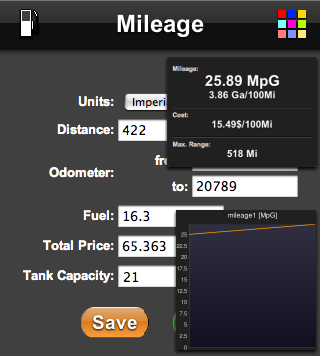
I just released my new iPhone Application: Mileage. It makes it quick and easy to calculate the fuel consumption of your car. In addition to the mileage it can give you the cost per mile and the maximum range.
http://mileage.speedymarks.com
Thursday, November 22, 2007
WorldClockr: Missing Timezones added
WorldClockr now contains a complete list of all timezones to choose from (please shout if I missed another one). Especially all non 1 hour time zones like Indias +5:30 have been added.
You can now have these timezones for your embedded clocks and in the iPhone version as well.
Wednesday, November 21, 2007
Thursday, November 1, 2007
Why Apple made Safari so fast

Apple claims that Safari is the fastest browser on any platform, and they seem to be right. Since I read that news I have been asking myself:
Why on earth did they put so much engineering effort into such a feature? Does anybody think Firefox, Opera or even IE are too slow? Compared to the network imposed waiting times the rendering doesn't matter. All browsers seem to be fast enough, so putting in more development time to optimize the rendering speed even further doesn't make any sense, right?
This is what I thought until I got the new iPod Touch in my hands. And now I understood. The Safari browser on the iPod (and the iPhone) is fast, by far the fasted browser I ever saw on a handheld device. I feels like a desktop browser and this must be the reason why Apple optimized Safaris rendering speed. Well done.
Wednesday, September 19, 2007
New iPhone Project: SpeedoMeter
I just started a new iPhone Application: SpeedoMeter. Point your iphone to:
http://speedometer.iphonemarks.com
This site helps to calculate the average velocity over a given distance. Use this to measure e.g. your walking and running speed or to calibrate your car speedometer.
Check it out:
http://speedometer.iphonemarks.com
This site helps to calculate the average velocity over a given distance. Use this to measure e.g. your walking and running speed or to calibrate your car speedometer.
Check it out:
Thursday, September 13, 2007
New Project: SpeedyMarks

On SpeedyMarks you can create visual bookmarks for your favourite websites. It is insprired by Operas Speed Dial feature and uses thumbnails from WebSnapr. This makes it the perfect startpage for your browser. The background color of the page and the size of the speedymarks can be changed.

You can add a button to your website to make the addition to SpeedyMarks very easy.
Example:
 (SpeedyMark for this blog)
Please check the iPhone version iPhoneMarks as well.
Saturday, September 8, 2007
New iPhone Project: iPhoneMarks

I started a new iPhone website: iPhoneMarks
iPhoneMarks makes it easy to open web sites on the iPhone, because you don't have to type the full URL. For your favourite web sites you can create visual bookmarks which are stored locally on your phone (not on a server).
Subscribe to:
Posts (Atom)